SSL Cerificate SSL Certificate Provider Company
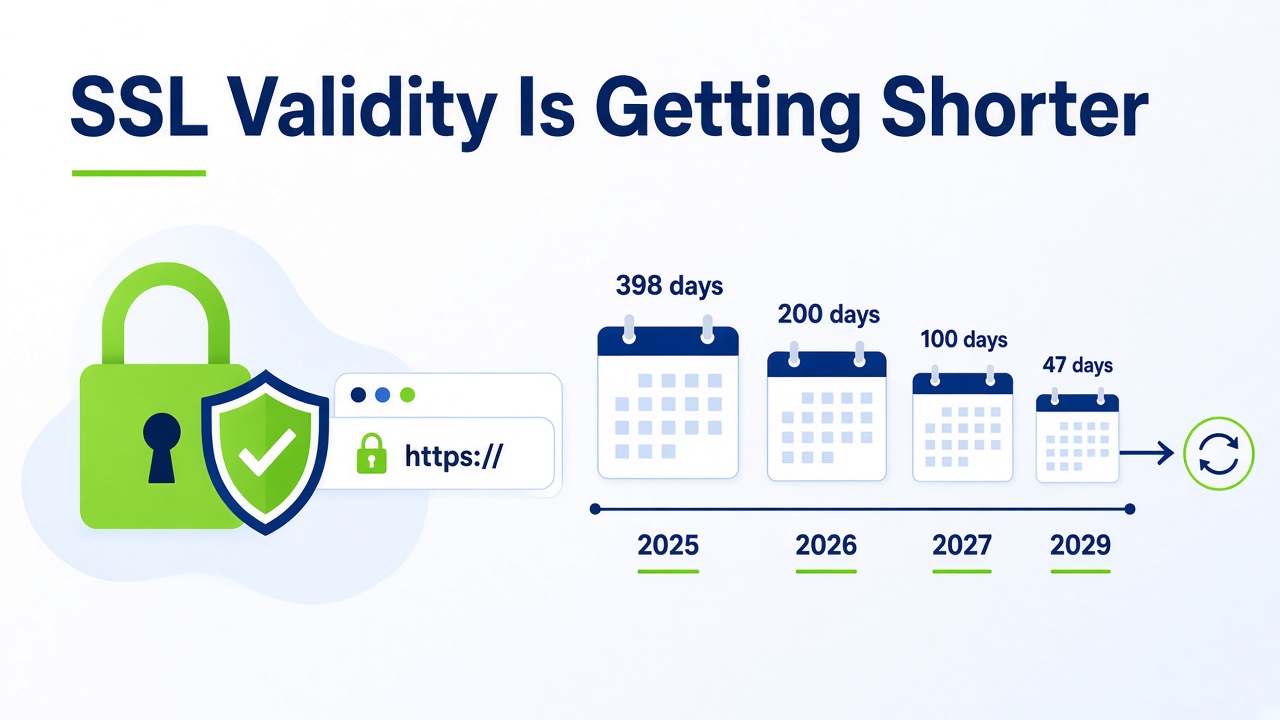
Short answer: yes, SSL/TLS certificates are getting much shorter lives. The 1-year (398-day) certificate ended on 15 March 2026. Today the maximum is 200 days (about 6½ months). From 15 March 2027 it drops to 100 days (about 3 months), and from 15 March 2029 to just 47 days.
The change comes from CA/Browser Forum Ballot SC-081, approved in April 2025. Every public Certificate Authority — DigiCert, Sectigo, GlobalSign, GeoTrust, Thawte, RapidSSL, eMudhra and others — must follow it. Browsers such as Chrome, Safari, Firefox and Edge will not trust certificates that break these limits.
SSL certificate validity timeline
| Certificate issued on or after | Maximum validity | Domain validation can be reused for |
|---|---|---|
| Before 15 March 2026 | 398 days (~1 year) | 398 days |
| 15 March 2026 (current) | 200 days (~6½ months) | 200 days |
| 15 March 2027 | 100 days (~3 months) | 100 days |
| 15 March 2029 | 47 days (~1½ months) | 10 days |
Why are certificate lifetimes being reduced?
- Less damage from stolen keys: a compromised certificate stops working sooner.
- Fresher validation: domain ownership and company details are checked more often, so stale or wrong data does not stay in use for a year.
- Revocation is unreliable: browsers do not always check revocation, so short expiry is the safer cut-off.
- Push towards automation: the industry wants renewals handled by tools (ACME, auto-install, monitoring) instead of manual yearly work.
Do I still buy a 1-year or multi-year SSL plan?
Yes. You can still buy 1, 2 or 3-year SSL subscriptions. What changes is the certificate inside the plan: it is issued for a shorter period and reissued free of cost before it expires, for the whole subscription. You pay once for the plan term; you reinstall (or auto-install) the new certificate each cycle.
What this means for Indian businesses
- More renewals per year: about 2 installs a year now, about 4 from March 2027, and roughly 8 from March 2029.
- Expiry risk goes up: one missed reinstall means a browser “Not Secure” warning, failed payment gateway checks (Razorpay, PayU, CCAvenue, bank APIs), broken mobile apps and lost customer trust.
- OV and EV need planning: organisation details are rechecked, so keep your company documents, GST/registration and contact numbers current.
- Every server counts: load balancers, mail servers, cPanel/Plesk hosting, Tomcat/IIS, firewalls and CDNs each need the new certificate.
How to prepare: a simple checklist
- List every certificate you use — domain, server, expiry date and who manages it.
- Turn on automation where possible (ACME clients such as Certbot, hosting panel AutoSSL, or your CA’s auto-install agent).
- Set up expiry monitoring with alerts well before the expiry date.
- Keep validation ready: make sure DNS or email/HTTP validation for your domains works quickly.
- Choose a multi-year plan so reissues are already paid for and you are not re-buying every few months.
- Check after each install that the full certificate chain and hostname are correct.
How SSL Firm helps
- Branded SSL from trusted CAs — DigiCert, Sectigo, GlobalSign, GeoTrust, Thawte, RapidSSL and eMudhra, with 1–3 year plans and free reissues.
- Free SSL tools — decode your CSR and check live installation from our SSL Tools page.
- Expiry monitoring — get alerts before a certificate runs out.
- Installation support — our team can install and verify each reissued certificate on your servers.
Need help planning for 100-day certificates? Call Sales on +91 95 8290 7788 or email sales@itmonteur.net. For existing orders, call Support on +91 94 8585 7788.
Source: CA/Browser Forum TLS Baseline Requirements, section 6.3.2 (maximum validity) and section 4.2.1 (validation data reuse), as amended by Ballot SC-081v3.